

Website Care Plan: What It Should Include and How to Compare Offers

A website care plan is a recurring service where someone takes responsibility for your site after launch: software kept current, backups running, problems noticed, small changes made. Some providers call it a maintenance plan or a management plan. The name tells you very little. What matters is the task list behind it, how often each task happens, and what you get when something breaks.
This guide covers what a good plan includes, what most plans leave out, and a scorecard you can use to compare two or three quotes side by side.
What a website care plan is, and what it isn't
Launching a site is the start of the work, not the end. Software ages, domains and certificates expire, forms stop delivering, and someone has to notice. A care plan puts a name against those jobs.
It helps to separate it from the things it gets confused with:
| Option | What it covers | What it doesn't |
|---|---|---|
| Doing it yourself | Whatever you remember to do | Anything you forget while the site looks fine |
| Hosting only | The server the site runs on | Your forms, content, code or business workflows |
| One-off fix | The problem you hired someone for | Anything that breaks next month |
| Care plan | Named, recurring tasks by a named provider | Anything not written into the scope |
The labels are a mess. There is no industry standard for what "care plan", "maintenance plan" or "support plan" means, so one provider's plan can match another's under a different name (FatLab makes the same point). Ignore the name and ask for the list.
What a good plan includes
Software updates
On a site built with a CMS such as WordPress, this means the core software, themes and plugins. Plugins are where most of the risk sits: Patchstack counted 11,334 new vulnerabilities in the WordPress ecosystem in 2025, 91% of them in plugins and only six in WordPress core (Patchstack, State of WordPress Security in 2026). A custom-coded site has no plugin layer, but it still has libraries and build tools that age.
A good plan tests updates before they go live and can undo one that misbehaves. Ask: "How do you test an update, and how do you roll it back?"
Backups you can restore
A backup you have never restored is a hope, not a backup. A good plan keeps copies away from the server the site runs on, on a schedule the provider can name, and has actually restored one to prove it works. Ask: "Where are the backups stored, and when did you last restore one?"
Security monitoring
This means scanning for malware and unexpected file changes, tight settings on admin logins, and a firewall where the platform offers one. The part people skip is the human one: somebody has to read the alerts and act on them. Ask: "Who gets the alert, and what happens next?"
Uptime monitoring
A tool checks the site every few minutes and alerts a person when it goes down. Without it, you find out from a customer. Ask who receives the alert and how quickly you would hear about it.
Speed and health checks
Periodic checks on page speed, broken links and images that have quietly grown too large. Google's guidance says not to focus on only one or two aspects of page experience (Google Search Central), and slow drift is easy to miss without a routine. Ask what is measured and how often.
Form and lead-path checks
If enquiries reach you through the website, the most expensive failure is a silent one: a contact form that stops delivering while everything else looks fine. A good plan tests the form on a schedule. If you also want an instant alert whenever a new enquiry arrives, that is a job for business automation.
Content edits
Small changes you ask for: opening hours, a price, a new photo, a paragraph. Decide up front what counts as an edit and what counts as new work. "Unlimited" needs a definition covering task size and turnaround time, otherwise it can mean unlimited tiny requests (WP Remote makes this point). Ask: "Give me one example of an edit and one example of something that costs extra."
Reporting
A short monthly note: what was updated, what was backed up, what was found and what was done about it. It is the only proof the work is happening. Ask what the report contains and when it arrives.
What most plans leave out
A care plan keeps a site healthy. It usually does not cover:
- Emergency work outside agreed hours
- Cleaning up after a hack
- New pages, features or redesigns
- SEO and marketing work
- Third-party costs such as domains, hosting and paid tools
The difference that catches people out is between maintenance and support. Maintenance is routine and happens before anything breaks. Support is the response when something does. Some plans cover the first without the second, and you find out when you call and are told to look elsewhere (FatLab describes the pattern). Ask a plain question: if the site breaks tomorrow, is fixing it in the price?
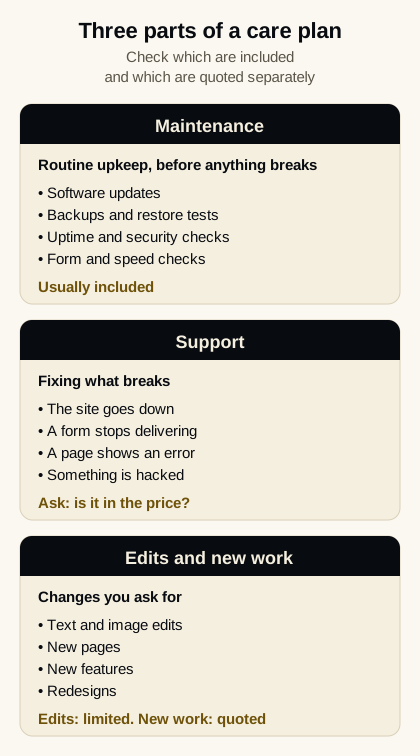
Three parts of a care plan. Check which are included and which are quoted separately.
Do you need one?
It depends on what the site is and who else would do the work.
- A site built on a CMS with plugins: usually yes, unless you are comfortable running the updates, backups and monitoring yourself.
- A custom-coded or static site: less to patch, because there is typically no plugin layer or CMS login to attack. It is not zero. Domains and certificates still renew, hosting settings still change, forms still break, and someone still makes the edits.
- A site that brings in enquiries: the cost of missing a problem is lost leads, so someone should be responsible for it.
- A hobby site where downtime doesn't matter: probably not.
A scorecard for comparing offers
Ask every provider the same questions in writing. Give one point for each clear answer.
| Question | A clear answer sounds like | Warning sign |
|---|---|---|
| Which tasks are included? | Named tasks, each with a frequency | Category labels only, like "security" |
| How do you test and undo updates? | Tested before release, can be rolled back | "We just run the updates" |
| Where are backups stored, and have you restored one? | Off the server, restore tested, with a date | "Backups are included" and nothing more |
| What happens when the site breaks? | Who to contact, how, and a target reply time | "Contact support" with no target |
| What counts as an edit? | A limit and examples | "Unlimited" with no definition |
| What is billed separately? | A written list | Answers that start with "it depends" |
| What do I get each month? | A short report | Nothing |
| Who owns the domain, hosting and code? | You do | The provider holds the logins |
| How do I leave? | A stated notice period and a handover of files | Long lock-in or fees to export |
Two providers at the same price with different scores are not the same offer. Treat two things as deal-breakers: a provider who holds the only logins to your domain or hosting, and a long lock-in with fees to leave.
Test them with three scenarios
Scores tell you what is written down. Scenarios show what happens in practice. Put these to each provider and see how specific the answers are:
- Your contact form stops working on a Friday evening. Who finds out, when, and is the fix included?
- An update breaks a page. How is it caught, and how fast is it rolled back?
- You want to leave in six months. What do you receive, and how long does the handover take?
A provider who answers these with names, steps and timings has probably done it before. One who answers with reassurance has probably not.
What it costs
Price follows scope, not the label: how big the site is, how many tasks are included, how quickly the provider commits to respond, and how many edits are covered. Quotes vary widely for that reason, so compare scorecard results before you compare prices. For published price ranges and what drives them, see our guide to website maintenance cost.
How Corevalo handles ongoing website management
Corevalo builds custom-coded websites and looks after them after launch. The Website Development & Management service includes ongoing edits, updates and hosting management, along with security best practices and monitoring, and it can take over an existing site.
Corevalo's own site is custom-coded and hosted on Cloudflare. There is no fixed package or price list: scope and billing are agreed per project before work starts, with a fixed quote after a short call. Clients own their code, content and accounts. You deal with the person doing the work, by email or WhatsApp.
Frequently asked questions
Is a care plan the same as a maintenance plan?
Often, yes. Neither name has a standard meaning, so compare the task list, not the label.
Do I need a care plan for a simple website?
Possibly a lighter one. A static site has less to patch, but domains, certificates, forms and edits still need an owner. If the honest answer to "who does these?" is "nobody", you have your answer.
Can I switch providers later?
Yes, provided you hold your own domain, hosting and code accounts. That is why ownership is on the scorecard.
Not sure what your site needs?
Book a call and we'll map out what your site actually needs.
Sources: Patchstack, State of WordPress Security in 2026 · Google Search Central, Understanding page experience · FatLab, WordPress care plan vs maintenance · FatLab, What is a WordPress care plan · WP Remote, WordPress care plans