

Business Automation
If your team's still doing this by hand every week, a workflow can probably take it off their plate.
We connect your tools, forms, inbox, and CRM so leads, follow-ups, and reports run automatically.
Spec sheet
- Starts at
- $300
Per workflow, fixed quote - Timeline
- Days for a simple workflow; 1–2 weeks for multi-step systems
- Built with
- n8n, Zapier or Make
- Connects
- Gmail, WhatsApp, Google Sheets, CRMs — most tools with an API
Scope
What’s included
- Lead capture & qualification automation
- CRM & inbox workflows
- AI-assisted response systems
- Scheduled reports (e.g. weekly leads report)
- Cross-platform integrations (WhatsApp, Gmail, Sheets, etc.)
Process
How it works
- 01
Audit
Map your current process.
- 02
Map the workflow
Design the automation flow.
- 03
Build & test
Wire it up and test edge cases.
- 04
Deploy & monitor
Go live with monitoring in place.
Proof
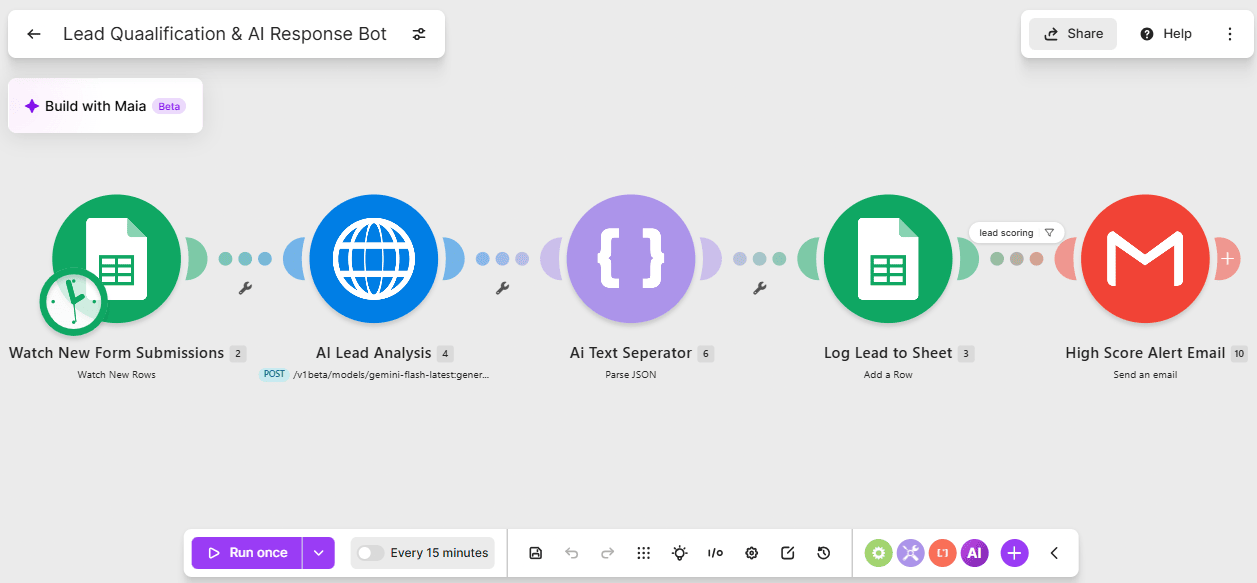
Lead Qualification & AI Response Bot
Every new lead is scored and answered automatically, so hot leads get a response in minutes, not days.
How much does an automation cost?
Starts around $300 for a single workflow; multi-step systems cost more depending on scope, confirmed after a short discovery call.
What tools do you automate?
Gmail, WhatsApp, Google Sheets, CRMs, and most tools with an API — via n8n, Zapier, or Make.
How long does an automation take to build?
Simple workflows take days; multi-step systems take one to two weeks.
Is my data safe?
Yes — we use secure, authenticated connections and never store credentials outside your own accounts.